
Create a document from a template - using populate syntax
Create a document from a template using populate syntax.
Step 1:
In the Quicklysign UI, go to your template page.
Make sure all your data_fields have custom_ids specified. These are used in your post request to populate the template before signatures are request.
Near the bottom of the template page, there's a link saying "Show API Information". Click this link and to view all the fields that can be used for populating the document.
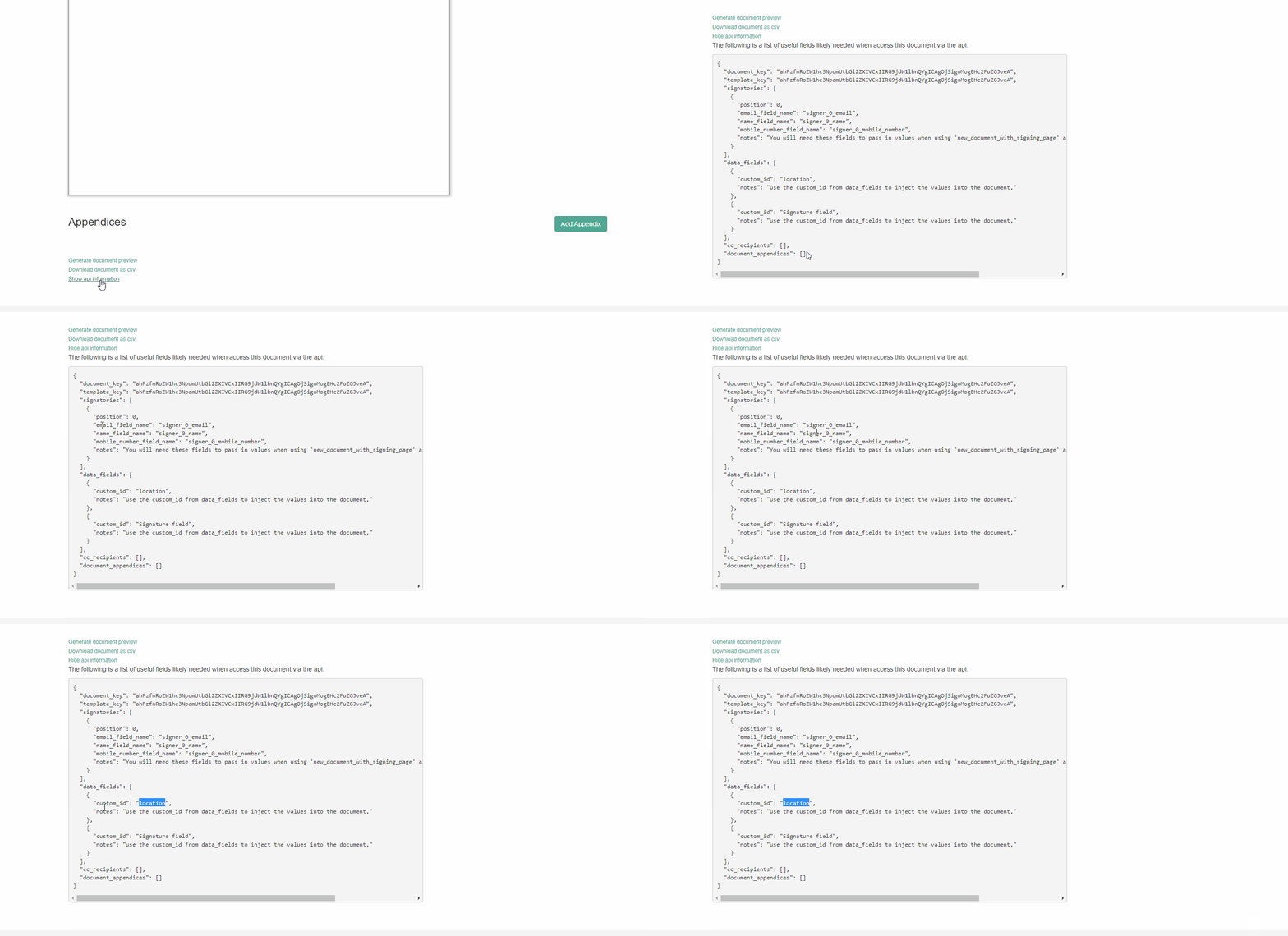
See documentation here: https://docs.quicklysign.com/docs/documents#section-using-populate-syntax
Step 2.
Call POST /documents/<document_key>/create_new_document_from_template?use_populate_syntax=true&auto_request_signatures_when_ready=true
(where the <document_key> is the key of the template you wish to copy).
with the body containing your parameters for the template.
The query string parameter "use_populate_syntax" indicates that this request must use the simplified syntax.
"auto_request_signatures_when_ready" indicates that a signature request can be sent immediately, as soon as the document is ready.
POST /v0/documents/ahFzfnRoZW1hc3NpdmUtbGl2ZXIVCxIIRG9jdW1lbnQYgICAgOjSigoMogEHc2FuZGJveA/new_document_from_template?access_token=<your token &use_populate_syntax=true&auto_request_signatures_when_ready=true HTTP/1.1
Host: sandboxapi.quicklysign.com
Content-Type: application/json
Cache-Control: no-cache
Postman-Token: 95d5db66-0781-41d3-a112-d8ab232d38e7
{
"signer_0_email":"[email protected]",
"signer_0_name":"Robert Curtis",
"location":"The Zoo",
"cc_0_email":"[email protected]",
"cc_0_name":"rob cc"
}curl -X POST \
'https://sandboxapi.quicklysign.com/v0/documents/ahFzfnRoZW1hc3NpdmUtbGl2ZXIVCxIIRG9jdW1lbnQYgICAgOjSigoMogEHc2FuZGJveA/new_document_from_template?access_token=<access_token>&use_populate_syntax=true&auto_request_signatures_when_ready=true' \
-H 'Cache-Control: no-cache' \
-H 'Content-Type: application/json' \
-H 'Postman-Token: 03214da5-ae36-4b0f-93a0-1e549d2011f0' \
-d '{
"signer_0_email":"[email protected]",
"signer_0_name":"Robert Curtis",
"location":"The Zoo",
"cc_0_email":"[email protected]",
"cc_0_name":"rob cc"
}'import requests
url = "https://sandboxapi.quicklysign.com/v0/documents/ahFzfnRoZW1hc3NpdmUtbGl2ZXIVCxIIRG9jdW1lbnQYgICAgOjSigoMogEHc2FuZGJveA/new_document_from_template"
querystring = {"access_token":"","use_populate_syntax":"true","auto_request_signatures_when_ready":"true"}
payload = "{\n \n\"signer_0_email\":\"[email protected]\",\n\"signer_0_name\":\"Robert Curtis\",\n\"location\":\"The Zoo\",\n\"cc_0_email\":\"[email protected]\",\n\"cc_0_name\":\"rob cc\"\n\n}"
headers = {
'Content-Type': "application/json",
'Cache-Control': "no-cache",
'Postman-Token': "1928d7bd-28a7-4968-aacd-3e9c64d15e2d"
}
response = requests.request("POST", url, data=payload, headers=headers, params=querystring)
print(response.text)Updated 6 months ago